📒About Biometric and Cryptographic checks
Defining these ID checks
To meet the Option 1 standard for Companies House identity verification, your firm must complete both a biometric check and a cryptographic check. Firmcheck makes it easy to send these checks to your clients together, streamlining the verification process and ensuring compliance.
🧬 Biometric Checks
A biometric check verifies a client’s identity by combining their proof of identity, proof of address, and a likeness image.
The client takes a photo of themselves, which is automatically compared to the image on their passport,
The client completes the process independently, and the resulting verification report is uploaded to Firmcheck.
You’ll find the report stored under the Proof of Identity section within the client record.
📒 Learn more:
🔐 Cryptographic Checks
A cryptographic check verifies the cryptographic features within a client’s passport to confirm its authenticity.
The client is prompted to download the Firmcheck app and follow on-screen instructions to scan the RFID chip in their passport.
The cryptographic check:
Confirms the passport matches the personal details provided by the client.
Proves the document is authentic and unaltered.
If the scan doesn’t match the details sent with the request (passport number, expiry date or date of birth), the client is told which detail didn’t match and asked to contact you. Check the details on their profile, correct anything wrong, then re-send the request.
📒 Learn more:
✅ Sending Both Checks Together
To simplify the verification process, you can send both the biometric and cryptographic checks together, avoiding the need to send two separate requests.
Here’s how:
Start by sending an Advanced ID check (this is the biometric check).
In the pop-out window, select the “Cryptographic” option to include that check in the same request.
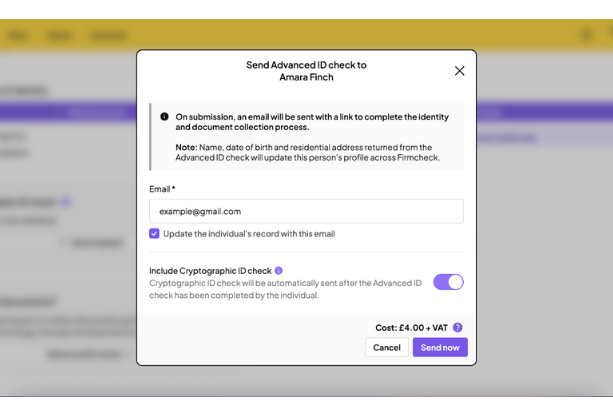
The client will first complete the biometric check. Once submitted, there is a short delay of a few minutes while Firmcheck uploads and stores the biometric report, after which the cryptographic check request is automatically sent.
🚨 In the Verification Requests tab, you will initially see only the biometric request. The cryptographic request will appear once the biometric check has been completed and processed.
📺 Watch a walkthrough of the full process and client experience: